June 28th, 2026
🛠️ Fixed
Linux (AppImage): command-based servers wouldn't start — launching an stdio server like npx, uvx, or python … from the AppImage could fail with connection closed: initialize response. They now start correctly against your system's runtimes. (The .deb, macOS, and Windows were unaffected.)
macOS: "Restart now" after an update did nothing — finishing an update now relaunches the app into the new version instead of leaving you to quit and reopen manually.
June 28th, 2026
🆕 New
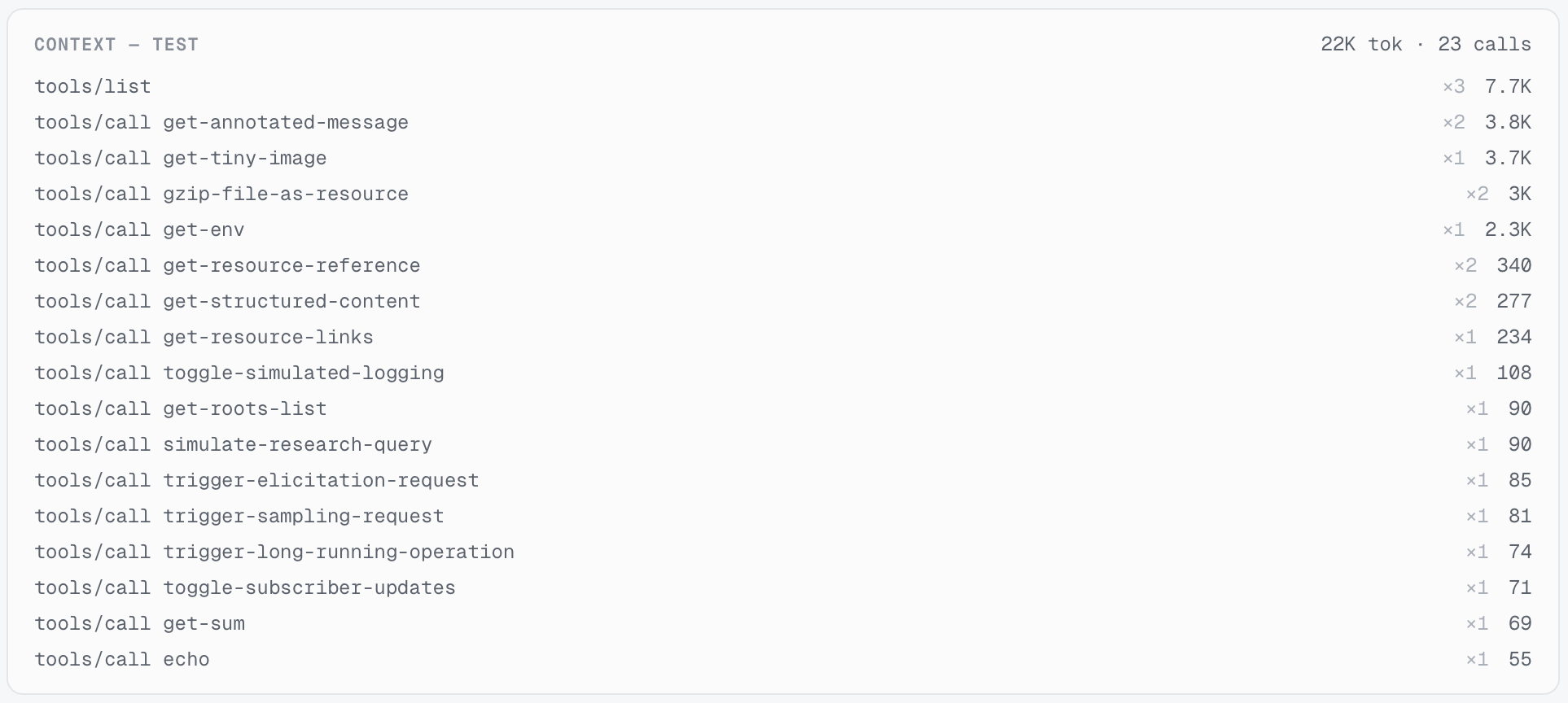
Live token meter in the proxy — while you're proxying, MCP Peek now tallies the total tokens captured for whatever you've selected (a single server or All servers). You get a new Context panel above the live flow with a per-tool breakdown — how many times each tool was called and the tokens it ran up — plus a running total in the toolbar gauge against your context budget. Clear your captured flows and it resets.
🛠️ Fixed
Linux AppImage opening to a blank window on Wayland — on Wayland (common on newer Linux distros) the AppImage could launch to an empty window. Fixed — it now renders correctly. (The .deb package was never affected and stays the recommended option on Debian/Ubuntu.)
June 24th, 2026
Improved
Fixed
Fixed:
macOS updates now reliably finish. After an update installed, the app could appear to do nothing instead of restarting. It now shows a clear "Restart now" prompt if the automatic restart doesn't kick in — so an update always completes
Improved:
Update progress is visible. Starting an update from Settings now closes the dialog, so the download progress and the restart prompt show on the main window instead of being hidden behind it.
June 24th, 2026
Improved
Fixed
Improved:
Clearer errors for missing commands — when a stdio server's command (e.g. npx, uvx, python) isn't installed, MCP Peek now names exactly what's missing and where to get it, instead of a cryptic "program not found." (MCP Peek runs these tools but doesn't bundle the runtimes.)
Polish — the app's executable is now named MCP-Peek (Task Manager / Activity Monitor no longer show app).
Fixed:
Windows installer icon — the setup now shows the MCP Peek icon instead of a generic one.
June 24th, 2026
New
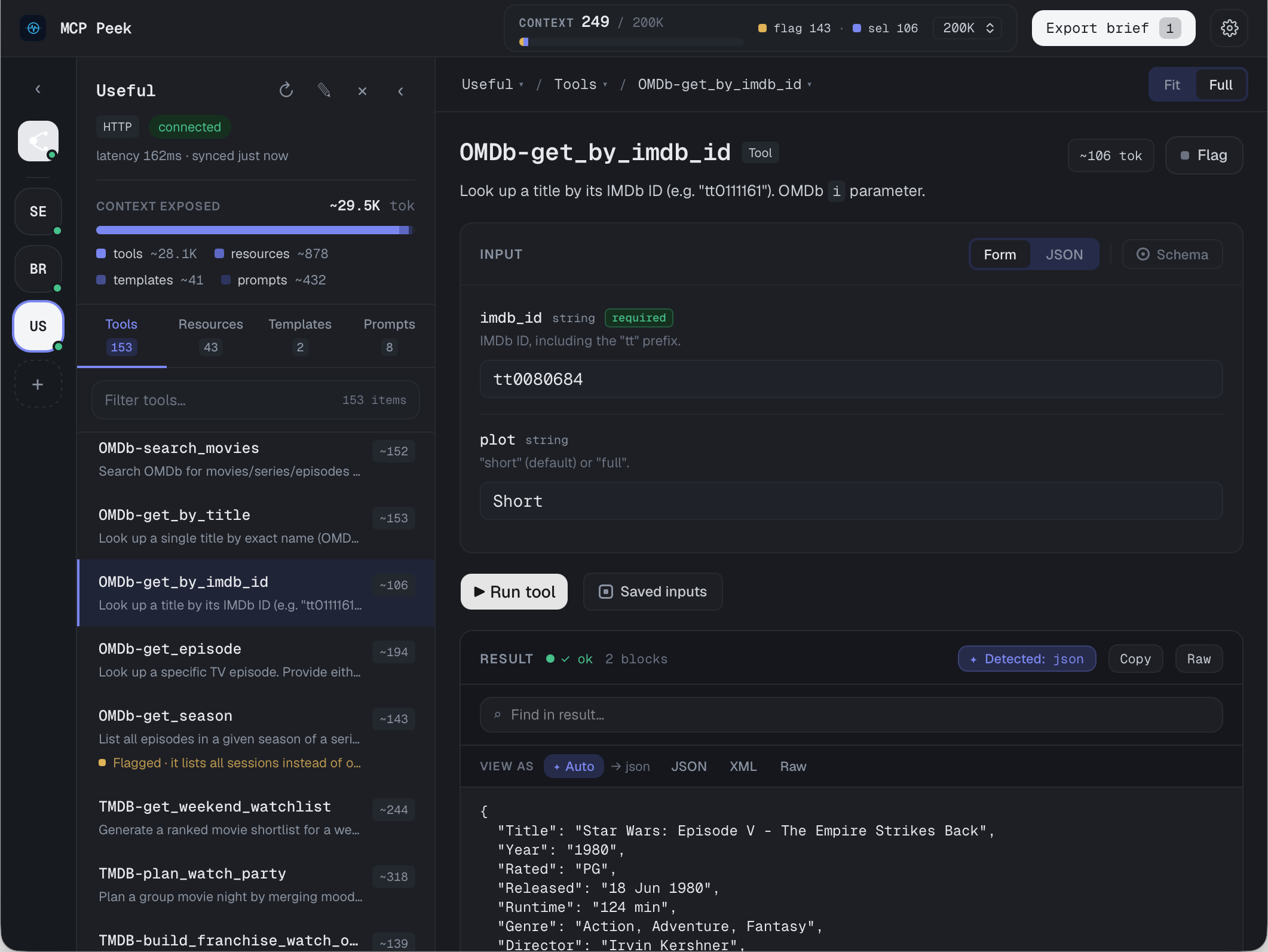
MCP Peek is here. 🎉 A fast, native desktop app for working with Model Context Protocol servers — connect, explore, exercise, and turn what you find into context for your coding agents. This first release ships everything you need to go from "what does this server actually expose?" to "here's a brief my agent can use."
🔌 Connect & explore
Connect to MCP servers over HTTP or stdio, with per-server transport, auth, and environment settings.
Browse a server's full catalog — Tools, Resources, Resource Templates, and Prompts — with search, category tabs, and live status.
Servers and connections reconnect on launch so you pick up where you left off.
▶️ Run things, fast
Schema-aware input forms generated automatically from each tool's JSON Schema — including nested objects, arrays, and maps.
JSON Skeleton generator for tool inputs: scaffold all fields or required-only, with clear <required>/<optional> markers, and fill from the form (replace or merge).
Resource Template inspector with RFC 6570 URI expansion — fill the parameters, preview the resolved URI, and read the resource.
Saved Inputs to recall named argument sets for any tool.
🔎 Proxy & observe
Proxy mode sits between a client and a server so you can watch the live JSON-RPC flow in real time — every request and response, as it happens.
📋 Flag & export
Flag interesting tools, resources, and prompts as you explore, then export a Markdown brief — ready to hand to Claude or any coding agent as context.
A context gauge keeps a running token estimate of what you've selected and flagged.
🖥️ Native on every platform
Universal macOS (Apple Silicon + Intel), Windows, and Linux (AppImage + .deb) — all code-signed and notarized.
Built-in auto-update: a quiet check on launch plus an in-app banner when a new version is ready — one click to install and relaunch.
🔒 Private by design
All network traffic and telemetry runs in the native core, never the UI. Crash reports are scrubbed of anything sensitive; product analytics are off by default and opt-in.
Free vs Pro: Everything above is free to try. Pro ($19, one-time) unlocks unlimited Saved Inputs and the Export Brief — grab a license.
Got feedback or a feature request? This board is the place — we read everything. 🙏